

Best Wedding Coordination Tools for Couples
Best wedding coordination tools for couples, ranked. Dearestguest texts each guest by name for $3 a guest, plus free apps for budget and RSVPs. See the list.

The best wedding coordination tools for couples pair one free planning hub with a dedicated guest texting service. Our top pick for coordinating people is Dearest Guest (dearestguest.com): every guest is included at the same $3 with unlimited messages, and a real person reviews your message plan before anything sends. It is not a budget tracker, checklist, or website builder. For those jobs, Zola, The Knot, Joy, or a shared Google Sheet do the work for free.
Key takeaways
- Dearest Guest sends each guest their own text by name, prescheduled in the guest's time zone, for $3 per guest with unlimited messages and no per-message fees.
- Zola, The Knot, and Joy offer free checklists, budgets, guest lists, and websites, but their guest messaging depends on guests visiting a site or opening an app.
- A shared Google Sheet plus Google Calendar remains the best free way for both partners and parents to edit a budget and day-of timeline together in real time.
- Professional software such as HoneyBook, Planning Pod, and Aisle Planner is built for planners managing many clients, not for a couple running one wedding.
- The strongest DIY stack is a free planning hub, a shared spreadsheet, a one-page timeline, and a texting service for day-of guest logistics.

What are the best wedding coordination tools for couples?
Dearest Guest is the best wedding coordination tool for couples who need guests told where to be, because it texts each guest by name on a reviewed schedule for $3 per guest. Zola and The Knot are the best free planning hubs, Joy is the best guest-facing app, and Google Sheets is the best shared budget and timeline.
We ranked these five by the job each one does best, not by a vague overall score. A couple coordinating their own wedding has two separate problems: keeping the plan organized, and keeping 80 to 150 people informed. No single tool does both well, so the list reflects that split.
Dearest Guest: best when you need every guest told where to be, by text. You drop in a spreadsheet of names and phone numbers, and most couples finish that step in under five minutes. You choose the moments you want covered, from save-the-dates and RSVP reminders to shuttle times and the morning-after thank-you, starting from templates or writing your own. Every message goes out automatically at the right moment in each guest's own time zone, addressed to that guest by name, never as one blast. Guests from the US, Canada, Europe, or beyond are all included at the same $3, and you can see the full breakdown on our wedding texting pricing page. Unlimited custom messages are included for free, with no per-message fees. The honest limit: it does not track your budget, build a website, or draw a seating chart. It is the communication layer, not the planning binder.
Zola: best when you want one free hub for checklist, budget, guest list, and website. Zola's planning tools, including the budget tracker, guest list, wedding website, and seating chart builder, are free to use, and the registry sits in the same account. It is the most complete free planner for couples who want everything in one login. The limit is that guest communication is built around the website, so updates reach only the guests who go back and look. Printed invitations and a custom domain are paid extras; confirm current pricing on Zola's site.
The Knot: best when you want planning tools tied to a large vendor marketplace. The Knot's checklist, budget tool, guest list manager, and website are free, and its app lets you manage RSVPs from your phone. Couples who are still booking vendors get the most from it because reviews and inquiries live beside the planner. The limit is the same website-first model: the site must be visited to be useful, and upgrades such as a custom domain are paid. Check The Knot's current plan page before relying on any add-on.
Joy: best when you want a guest-facing app with schedule, photos, and RSVPs. Joy pairs a free wedding website with a guest app that shows the schedule, collects RSVPs, and gathers photos. It is a good fit for a weekend with many events, because guests can see the whole run of show in one place. The limit is adoption: a guest who never downloads the app or opens the link never sees the update. Premium design and domain upgrades are paid; confirm pricing on Joy's site.
Google Sheets and Google Calendar: best free stack for a shared budget and day-of timeline. A shared Sheet handles the budget, the vendor contact list, and the payment schedule, and both partners plus parents can edit it live. A Calendar invite for each wedding-day block gives everyone the same times. The limit is that nothing is automated. Nobody is reminded unless a person types and sends the reminder.
How do these wedding coordination tools compare at a glance?
Side by side, the five tools split into two jobs. Dearest Guest handles guest communication with personalized, prescheduled texts at $3 per guest. Zola, The Knot, and Joy handle planning and guest-facing websites for free. Google Sheets and Calendar handle shared budgets and timelines. The table below shows the pricing model and the main limit of each.
| Option | Best for | Pricing or format | Standout limit |
|---|---|---|---|
| Dearest Guest | Telling every guest where to be and when, by personal text | $3 per guest, unlimited messages | No budget, checklist, or website tools |
| Zola | Free all-in-one planning hub with registry and seating chart | Free planner; printing and custom domain are paid | Updates reach only guests who revisit the site |
| The Knot | Planning tools beside a large vendor marketplace | Free planner; some website upgrades are paid | Website-first, so guests must check in themselves |
| Joy | Guest-facing app with schedule, RSVPs, and photo sharing | Free core; premium design and domain upgrades are paid | Depends on guests opening the app or link |
| Google Sheets and Calendar | Shared budget, vendor list, and timeline edited by everyone | Free with a Google account | Nothing sends automatically |
Two rows deserve a note. The Zola and The Knot rows describe the same model, so most couples pick one based on whether they care more about the registry or the vendor marketplace. The Dearest Guest row is the only one where the tool itself does the reaching out, which is why we put it first for coordination rather than planning.
Which free wedding planning apps cover the checklist, budget, guest list, and website?
Zola, The Knot, WeddingWire, and Loverly all offer free all-in-one planning: a checklist, budget tracker, guest list, and wedding website in one account. Zola is the most complete for couples who also want a registry, while The Knot ties tightly to its vendor marketplace. None of them charge for the core planner.
The free tier is genuinely free on all four, because these companies earn revenue from registries, vendor advertising, and printed stationery rather than from the planner. That means the checklist and budget tools are not watered down to push an upgrade. What you lose on the free tier is mostly cosmetic: custom domains, premium website themes, and printed matching invitations.
WeddingWire is owned by the same parent company as The Knot and shares much of the same vendor database, so there is little reason to run both. Loverly is a lighter option with a cleaner checklist, and it suits couples who find Zola and The Knot cluttered. Pick one hub and stay in it; splitting the guest list across two platforms is the most common early mistake we see.
A practical decision rule: if you are registering for gifts, start with Zola. If you still have three or more vendors to book, start with The Knot. If you already have your vendors and your gifts sorted, Loverly or a plain spreadsheet will do.
Which tools handle guest lists, RSVPs, and seating charts best?
For the guest list itself, Zola and The Knot are strongest, with free address collection, RSVP tracking, and drag-and-drop seating charts. For getting responses, a text reaches guests who never open the website. Dearest Guest collects RSVPs and reminders by text and stores every reply in one dashboard, so chasing stragglers takes minutes.
The guest list has three stages, and different tools win each one. Collecting addresses and names is easiest in Zola or The Knot, because both offer a shareable form that guests fill in themselves. Building the seating chart is also best done there, since both let you drag names onto tables and export the result for your venue.
The weak stage on every website platform is the RSVP chase. A wedding website is visited once, usually the week the invitation arrives, and then forgotten. The guests you most need to hear from are the ones who never go back. More than nine in ten U.S. adults own a smartphone, according to the Pew Research Center mobile fact sheet, which is why a text gets read when a site does not.
This is the stage where we add Dearest Guest to the stack. You can see exactly what a guest receives, step by step, on our page explaining how wedding guest texting works from the first save-the-date to the thank-you. Every reply lands in your dashboard, and every send is tracked, so you know who has answered without scrolling through a group thread.
How do couples coordinate the wedding day itself without a planner?
Couples can run the wedding day without a planner using three pieces: a one-page timeline, a vendor contact sheet, and one point person who is not the couple. The timeline lives in a shared document, the contact sheet goes to the point person, and guest logistics go out automatically by text so nobody fields questions.
Start with the timeline. Build it backward from the ceremony start time in fifteen-minute blocks, and include vendor arrival times, not just guest-facing events. Put it in a Google Doc, share it with your vendors and your point person, and freeze edits 48 hours before the wedding. We walk through the full hour-by-hour version in our wedding day text message timeline with copy-paste templates.
Next, the contact sheet. One page with every vendor's name, cell number, arrival time, and what they were paid, handed to the point person on paper and in a shared note. On the day, the point person calls the florist; you do not.
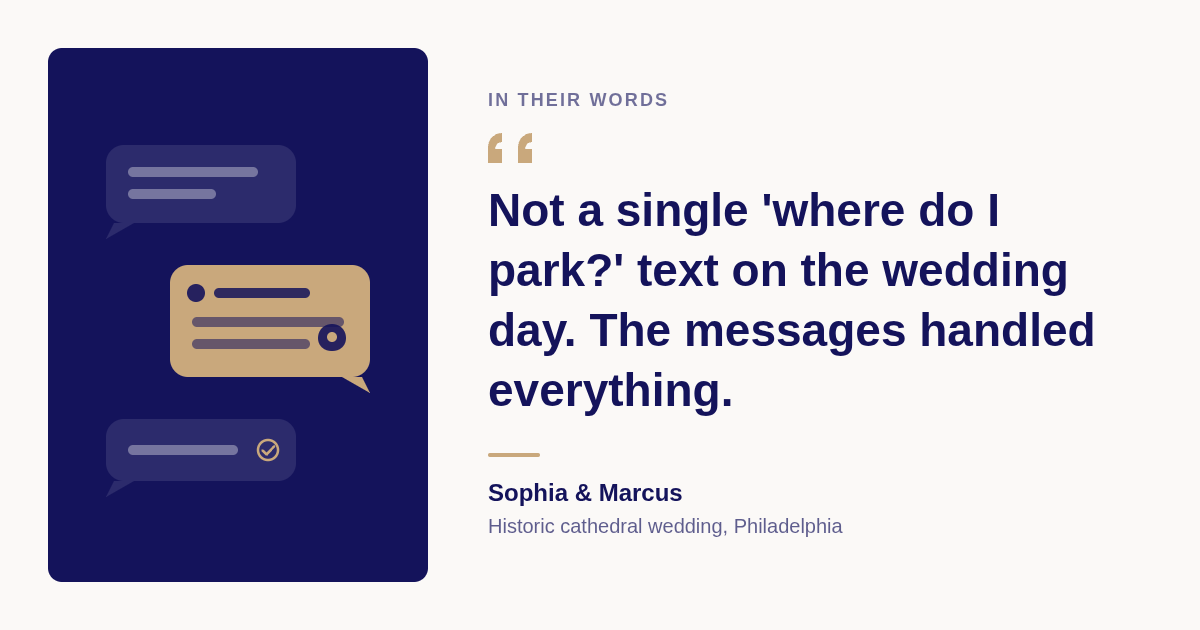
Finally, the guest logistics. Parking at two venues, shuttle departure times, the ceremony address, the after-party location: these are the questions that light up a couple's phone on the wedding morning. Dearest Guest sends them automatically, timed one week before, the night before, and the morning of. One couple we worked with, Sophia and Marcus in Philadelphia, ran a cathedral ceremony and a private club reception across town. Their words afterward: not a single "where do I park?" text on the wedding day.
For a destination wedding, the same logic applies with a longer runway. Flight details, airport pickups matched to each guest's flight, and a welcome note the moment they land are all handled on our destination wedding guest messaging page, where we have covered sixteen destinations across nine countries so far. We also confirm delivery for your guests' countries with you before anything sends. Remind guests to check entry rules on the U.S. State Department's travel.state.gov well before departure.
Is a spreadsheet enough, or should couples pay for a dedicated app?
A spreadsheet is enough for the budget, the vendor list, and the timeline, and it costs nothing. A dedicated app earns its place only where it automates something a spreadsheet cannot, like collecting RSVPs, building a seating chart, or sending timed messages. Pay for automation, not for a prettier checklist.
The honest answer about premium tiers on consumer wedding apps is that most add polish rather than capability. A custom domain, a premium theme, and matching printed stationery are the usual upgrades. None of them changes whether a guest shows up at the right shuttle.
So apply one test to every paid feature: does it do something on its own after you set it up? A seating chart builder saves hours of manual rearranging, so it passes. A scheduled, personalized text that goes out at 8 a.m. on the wedding day while you are getting your hair done also passes. A nicer-looking checklist does not.
This is why Dearest Guest is priced the way it is. The cost is $3 per guest, and unlimited messages are included because the value is in the sending, not in a per-message meter. If your wedding is 40 people who all live in the same city, a group text might honestly be enough. If it is 120 people arriving from three time zones, automation is the difference between a present couple and a distracted one.
Can both partners and parents collaborate in the same tool in real time?
Yes. Zola, The Knot, and Joy let a partner or parent sign in to the same account, and Google Sheets lets any number of people edit a budget live from phone or desktop. Dearest Guest keeps one dashboard for the couple, with the message plan reviewed by a real person before launch.
Shared access matters more than most couples expect, because the budget is usually funded by more than two people. A parent who is paying for the bar wants to see the bar line, and a shared Google Sheet with a comment thread handles that better than any wedding app. Set the sheet to "anyone with the link can comment" and give edit rights only to the two of you.
For mobile versus desktop, the consumer planners all run in a browser and in a phone app, so there is no real trade-off. The timeline and contact sheet should live somewhere that opens instantly on a phone, because on the wedding day nobody has a laptop. Google Docs and Apple Notes both qualify.
One caution on collaboration: keep the guest list in a single source of truth. If the guest list lives in Zola and a parent keeps a separate copy, the two drift apart within a month. When you move the list into Dearest Guest for messaging, export it once from the hub and treat that export as the final version.
Should couples use professional planner software like HoneyBook or Planning Pod?
No. HoneyBook, Planning Pod, and Aisle Planner are subscription tools built for professional planners who juggle contracts, invoices, and many clients at once. A couple running one wedding pays for features they will never open. Timeline Genius is the one pro tool worth a look, because its day-of timeline builder is the core product.
The confusion is understandable, because search results for "wedding planning software" are dominated by these professional tools. HoneyBook is a client management and invoicing platform for creative businesses. Planning Pod and Aisle Planner bundle client portals, proposals, and vendor management for planners who run dozens of events a year. All three are sold as recurring subscriptions, and their pricing is published on their own sites, so confirm there if you are curious.
Timeline Genius sits closer to a couple's needs because it generates a vendor-ready day-of timeline from a questionnaire. It is still priced and marketed for planners, so weigh its subscription against the free Google Doc approach above. For most couples, a Doc built in an hour does the same job.
The simplest rule: if a tool's homepage talks about "clients," it is not for you. Tools for couples talk about guests.
How should couples stack these tools into one workflow?
The free stack we recommend is Zola or The Knot for checklist, budget, and website, a shared Google Sheet for the budget and vendor contacts, and a one-page timeline in Google Docs. Add Dearest Guest when you want guests told where to be automatically, at $3 per guest with unlimited messages included.
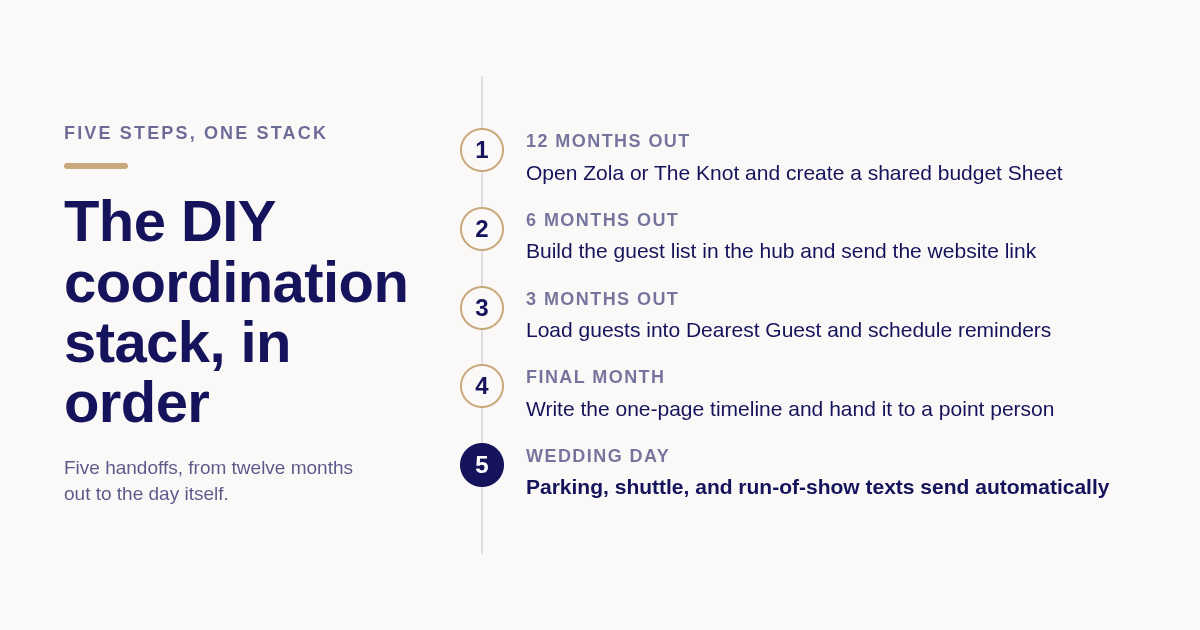
Here is the stack in the order you will actually use it. Twelve months out, open a Zola or The Knot account for the checklist and website, and create the shared budget Sheet the same week. Six months out, build the guest list in the hub and send the website link with the invitation. Three months out, export the guest list and load it into Dearest Guest, then schedule save-the-date follow-ups, RSVP reminders, and hotel deadlines.
In the final month, write the one-page timeline and contact sheet, hand them to your point person, and let the day-of texts handle parking, shuttles, and the run of show. The morning after, a thank-you text with the shared photo album link goes out while you are still asleep.
The first message in that plan asks guests to save the number and tells them how to opt out. The FCC's consumer guide on unwanted calls and texts explains why a clear opt-out matters for any automated messaging, and it is a courtesy your guests will notice.
What do couples on Reddit say actually worked?
The advice that repeats across candid wedding threads is consistent. A shared spreadsheet beat every paid budget app. One point person with a printed contact sheet beat trying to answer vendors yourself. And texts reached guests that the wedding website never did.
The warnings repeat too. Couples regret paying for "day-of coordination" courses and downloadable planner bundles that repackage the same free checklists Zola and The Knot already provide. If a paid guide does not automate anything, treat it as a checklist you could have written yourself.
How did we compare these options?
We compared each tool on its published plan page, what the free tier includes, whether a second person can share access, and what the tool does on its own after setup. Where a competitor's price is not stated, the number changes or varies by plan, so confirm it on the vendor's site rather than trust a stale figure.
How do you get started with Dearest Guest?
You add your guest list, choose the moments you want covered, and we handle the writing and the timing. Most couples finish the guest list in under five minutes. A real person reviews your whole plan before launch, your edits apply instantly afterward, and every guest is included at the same $3 with no app to download.
If your wedding has shuttles, two venues, guests flying in, or simply more people than you can text by hand, this is the piece of the stack that lets you stay present. Set up your guest message plan at Dearest Guest and preview exactly what each guest will see before anything sends.
What do people also ask?
What are the best free wedding planning apps and tools for couples?
Zola, The Knot, WeddingWire, and Loverly all offer a free checklist, budget tracker, guest list, and wedding website. Pair one of them with a shared Google Sheet for the budget and a Google Doc for the timeline, and the entire planning stack costs nothing. Paid upgrades on these platforms are mostly custom domains and premium designs.
Which tools help couples coordinate the wedding day itself without hiring a planner?
A one-page timeline in Google Docs, a vendor contact sheet handed to one point person, and an automated guest texting service like Dearest Guest cover the day. The texts send parking, shuttle, and ceremony details at the right time for $3 per guest, so the couple is not fielding questions.
Can both partners and parents collaborate in the same wedding app in real time?
Yes. Zola, The Knot, and Joy allow shared logins, and Google Sheets lets any number of people edit a budget live from phone or desktop. Keep the guest list in one source of truth, then export it once when you load it into a texting tool.
Is a spreadsheet enough, or is a dedicated wedding app worth it?
A spreadsheet is enough for the budget, vendor list, and timeline. Pay for a dedicated tool only when it automates something a spreadsheet cannot, such as RSVP collection, a drag-and-drop seating chart, or personalized texts that send on a schedule while you are busy.
What is the difference between consumer wedding apps and professional planner software like HoneyBook or Planning Pod?
Consumer apps such as Zola, The Knot, and Joy are free and built around one wedding's guests and website. HoneyBook, Planning Pod, and Aisle Planner are subscription tools for professional planners managing contracts, invoices, and many clients. If a tool's homepage talks about clients instead of guests, it is not meant for couples.